Guide · Tactworks

Cold email example:
pitching a website to a local bakery

A web designer wants to offer a neighborhood bakery an online ordering website. Here are the exact fields we filled in, the full email Tactworks wrote, and what to change before you hit send.

Published 27 October 2026 · Example made on iPhone with a TestFlight beta build of Tactworks (1.0.5)

The situation

One short email, one clear ask

Sam Taylor builds mobile-friendly websites that let small bakeries take orders online. Maria runs a neighborhood bakery that doesn't take online orders yet. Sam has never spoken to her, so this is a cold email: the goal is not to sell a website in one message, only to get a 15-minute call on the calendar.

Sam and Maria are example names. Everything else on this page — the inputs, the screens and the email — is what Tactworks actually produced.

Step by step

How to write it in Tactworks

  1. On the home screen, tap Business Outreach, then choose the Cold Email tab at the top. (The other tab, Sales Email, is for a direct pitch.)
  2. Fill in the form. These are the values we used:
    Product / ServiceMobile-friendly websites that help local bakeries take online orders
    Target AudienceOwners of small neighborhood bakeries
    Goal (optional)Book a 15-minute call
    ToneFriendly (the other options are Professional, Direct and Curious)
    Recipient (optional)Maria
    Your Name (optional)Sam Taylor
  3. Tap Generate Email. The email opens in a sheet titled Cold Email, with the subject line at the top.
  4. Tap Copy All, paste it into your mail app, and edit it before sending (see below).
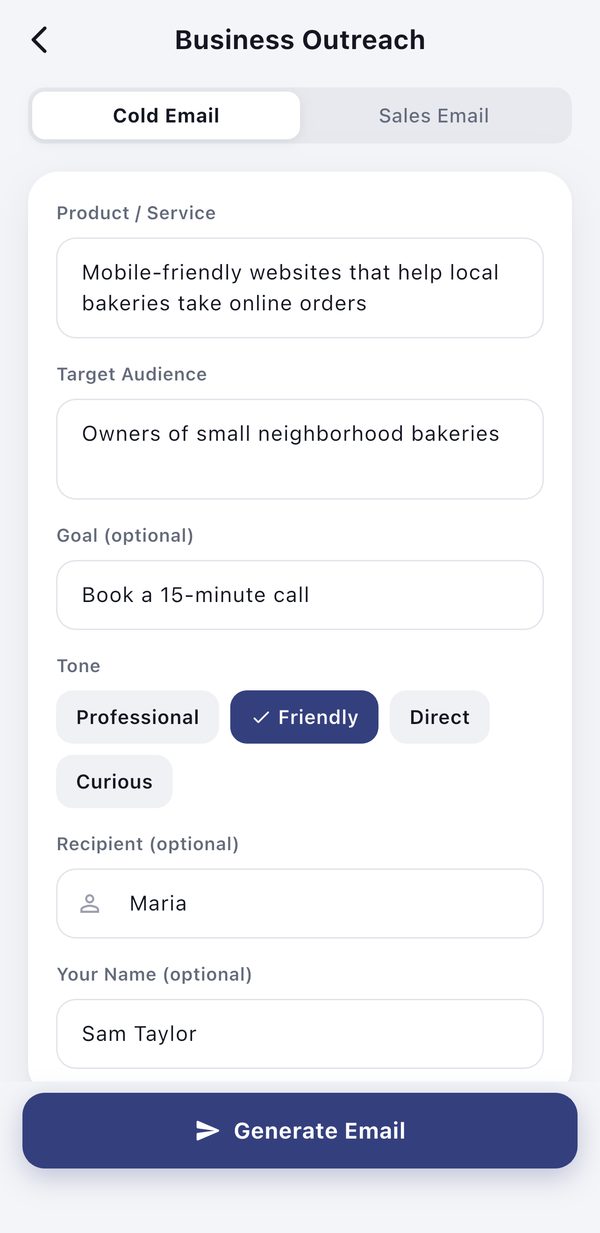
Tactworks Cold Email form filled in for a bakery website pitch, with the Friendly tone selected
The Cold Email form with our inputs and the Friendly tone.
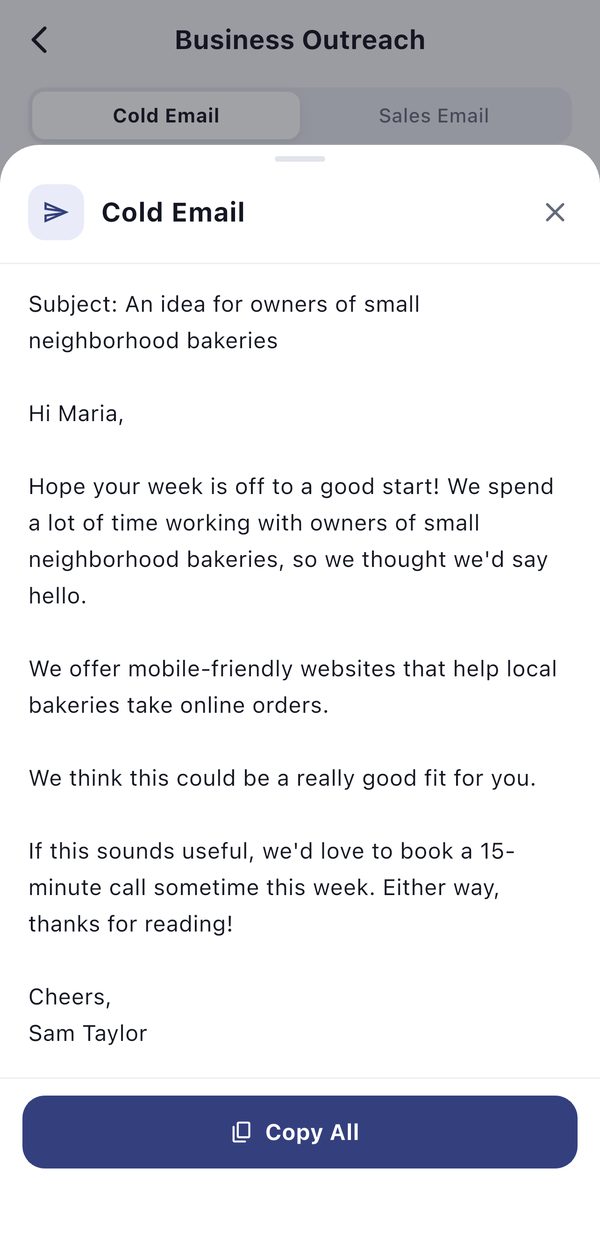
The finished cold email to Maria in the Tactworks result sheet, with a Copy All button
The result: the whole email fits on one screen.

iPhone screenshots, October 2026, with the status bar cropped.

The result

The email Tactworks wrote

Subject: An idea for owners of small neighborhood bakeries

Hi Maria,

Hope your week is off to a good start! We spend a lot of time working with owners of small neighborhood bakeries, so we thought we'd say hello.

We offer mobile-friendly websites that help local bakeries take online orders.

We think this could be a really good fit for you.

If this sounds useful, we'd love to book a 15-minute call sometime this week. Either way, thanks for reading!

Cheers,
Sam Taylor

Shown unedited. The wording changes each time you generate, so you will get an email like this one rather than this exact text.

Why it works

What this draft gets right

Before you send

Three edits worth making

  1. Replace the generic line. "We think this could be a really good fit for you" doesn't tell Maria anything. Swap it for one specific sentence of your own, such as a bakery site you have built or something you noticed about her shop.
  2. Make the subject line personal. The subject is built from the Target Audience field. Something that mentions her bakery by name will feel less like a mass email.
  3. Check the details. Read the email once as Maria would. Fix anything that doesn't match how you actually work before you send it.
What we learned

Tips for better inputs

We tried a few versions of this example before keeping the one above. What made the difference:

More guides

Other real examples

Course outline exampleIntro to Photography, 6 modules over 4 weeks, built in Slateroom. Blog post outline exampleHome coffee brewing for beginners, outlined in Draftmill.

Write your own cold email

Tactworks is free to download, with five free emails to try. See what else it writes.

Download on the App Store →